Universal Remote
Control For Tv Box Air Conditioner App Ir Infrared Mini Adapter
USD $13.59
Condition : New
Free Shipping
{{variant_type_name}} :

Notify me when the price drops
We will email you if we find a lower price on this product!
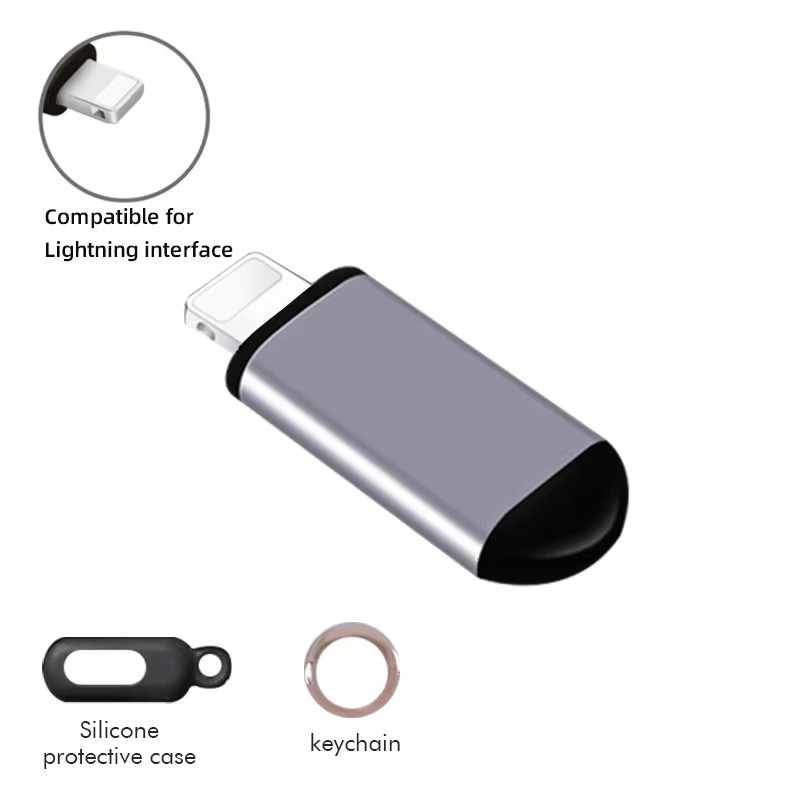
JOYROOM IR Appliances Wireless Infrared Remote Control Adapter Smart Mobile Phone Infrared Transmitter For iPhone IOS / Micro USB / Type-C Home AC TV Fan Appliance Controller (Note:Type-C not support iOS;iPhone15 USB-C not work with Andriod ) Note: This product works with APP (ZaZaRemote/Ocrustar)! Please make sure that the App supports your device before buying! Interface: Lightning/Type-C/Micro
Infrared emission wavelength: 940nm
Launch angle: 30 degrees
Emission intensity: 70-80mW/Sr
Actual distance: 8-12 meters (Lightning)
10-15 meters (Micro/Type-C)
Support system: iOS system/Andriod System (with OTG function)
Product Features: ➤Aluminum shell
➤Four generation chips/TPU inner shell/Infrared emission light/Lightning interface/PC lampshade
➤Make your life more convenient
➤Mini and compact design Universal remote for appliance
➤Say goodbye to messy remote control
➤Help you enjoy the convenient life
➤3 interface/Widely compatible for AC/TV
➤Range/Distance: Within 10 meters
➤Anti-lost design/Waterproof/dustproof
➤Upgrade. no need to use bluetooth
➤Integrated multi-function ir controller
➤very useful gadgets, say goodbye to messed controller Instruction Method: 1. Open This Link:
http://app.elksmart.com/ 2.. You will receive a instructions in your package such as a picture For Android phone instruction: For android phone instruction:
➤Step 1) : Search and download “ Remote Elf” App
➤Step 2) : Turn on “ OTG” Function in the setting
➤Step 3) : Open the App and insert this remote control into phone
➤Step 4) : Pair electric appliances andconnection control
➤Step 5) Then Done: Start to control your home applicance For iPhone phone instruction: ➤Step 1) : Search and download “ Remote Elf” App
➤Step 2) : Open the App and insert this remote control into phone
➤Step 3) : Pair electric appliances, after waiting for the full response of buttons, enter the control interface
➤Step 4) Then Done: Start to control your home applicance
How to use
you will receive a instructions in your package such as a picture.
Scan to download app
About Using Problem (Must Read before shopping)
“Infrared transmitter does not work?” (if it is unrecognized,please check and confirm if the mobile phone support OTG,Or contact customer service to help you solve)
For iPhone:
1.Check if the phone case is stuck and not plugged in properly.
2. If remote control is not possible, you need to turn off the mono function and equalizer function, in "Settings"-"Accessibility"-"Audio/Visual"-turn off "Mono" and in "Settings"-"Music"-off "Equalizer"
3. After the above settings are complete, the remote control is still not possible after all code libraries are matched. Please contact customer service and we will solve the problem for you.
For Android:
1. Check whether the mobile phone has OTG function, some mobile phones need to open OTG manually.
2. Check that the phone case is stuck and it is not plugged in properly.
3. A matching code library is required. If the correct code library is not matched, it cannot be used normally
4. If there is no response after matching dozens of code libraries, the infrared remote control code of this model is not collected in the software, please contact customer service, we will solve the problem for you. Instruction Method: 1. Download APP iOS system(Lightn*** version),firstly,search and download“Ocrustar"in APP Store,then open the application after download Android system (Micro USB and Type-C version),search and download “Ocrustar” on the android application market,for the English version,please search “Ocrustar"(internation alversion),open the application after download. 2.Insert the Remote-control Accessories IOS system (Lightn*** version)
Open the APP after download,insert the remote-control accessories into the mobile phone's Lightn*** interface. Android system(Micro USB and Type-C version)Open the APP after download, insert the remote-control accessories into the mobile phone's Micro USB interface or Type-C interface. 3. Adapt to infrared electrical appliances (1) After confirming that the remote control accessories are connected, open the APP to enter the remote control interface, click "=" in the upper left corner, click "+", and select the type of electrical appliance in "Add Control" interface, and then select the appliance brand. Point the remote control head at the air conditioner, within 4 meters from the air conditioner. (2) Manual matching: When matching, please aim the remote control head at the home appliance and press the button on the interface. When the appliance responds, it responds. If the appliance responds to the buttons on the matching interface, the full remote control interface will appear. If the home appliance does not respond when the button is clicked, click the "No response" button to jump to the next code base and perform the same matching. (3) In addition, you can also enter the home appliance model, directly in the search box of the "Add Control" interface, through which you can quickly find the remote control code. 4.Save the remote-control unit After adapting the appliance as perinstruction,save the remote-control unit and it can be used directly in the next time. 《After-sales policy》
Our goal is to make you are a happy buyer and pleasant shopping with us. PLEASE contact with us before leaving any 1 or 2 ratings, negative feedback or open any ebay or paypal dispute. We understand the concerns and frustrations you might have, we will do our endeavor to resolve the issues. Please give us a opportunity to resolve any problem. Thanks! 《Shipping》
1. All the items will be dispatched within 1-2 business days after the payment is clear.
2. Please verify your eBay primary shipping address. We are not responsible for any wrong or undeliverable addresses.
3. We are not responsible for any customs duty or import tax, but usually we write lower value on the customs declaration to avoid your import tax .
4. We ship worldwide by SpeedPAK(eBay official logistics)and other postal usually .We also provide Express delivery FedEx ,DHL, EMS, Aramex etc if you are can to add shipping costs. United States(Non-remote area) 10-22 working days
Germany / United Kingdom /Canada /Australia /France /Spain /Eastern Europe about 10-30 working days
Greece/Israel /Brazil / South America / Africa and The Other nations maybe takes about 2-11 weeks Note: The above is the delivery time of most packages !As international shipping is affected by many unsteady factors: Epidemic,customs, flights, weather, war, trade policy ,natural disaster etc uncontrollable factors , some shipments do get delayed sometimes!So please do contact with us if you have not got the items after the referred times.On Jun 19, 2025 at 00:27:26 PDT, seller added the following information:

Price type
IN STOCK
OUT STOCK


Digital Plug in Thermostat - Programmable Thermostat with LCD Screen, Temperatur
By Unbranded

$44.47

Digital Plug in Thermostat - Programmable Thermostat with LCD Screen, Tempera...
By Unbranded
$47.82




 .
